The last post was about driving Claude Code well inside a single session. This one is about the thing that makes the next session start further along than the last one did.
The signal that you need this is specific. You correct the same thing three times in a week. You paste the same six lines of context at the start of every session. You explain your naming convention, again, to something that has no memory of the last four times you explained it. All of that is fixable, and the fix lives in a folder.
Two folders, and they do different jobs
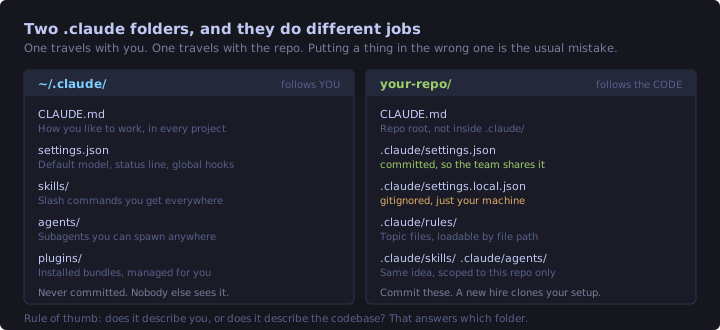
There is a .claude in your home directory and a .claude in each repo. Everything below is really a question of which one a given file belongs in, and the answer is always the same test: does this describe you, or does it describe the codebase?
Your preference for short commit messages describes you, so it goes global. The fact that this project uses Tailwind v4 with no config file describes the codebase, so it goes in the repo and gets committed. Get that backwards and you either leak personal preferences into your team's repo or find yourself rewriting the same project setup on every machine.
The project one is meant to be committed. That is the part people skip, and it is the part with the highest payoff, because a well-configured .claude directory means a new contributor clones the repo and gets your conventions for free.
CLAUDE.md, and the temptation to overfill it
Start with /init. It reads your workspace and writes a starter CLAUDE.md describing the project. It is a genuinely good first draft.
Then delete about half of it.
I mean that literally. /init is thorough, and thorough is the wrong target here, because of how this file gets used.
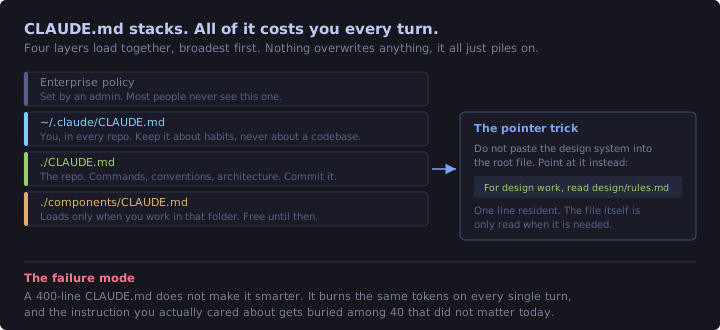
Four layers load together, broadest first, and none of them overwrite each other. It all just stacks. And it stacks into the context window at the start of every session and stays there for every turn of the conversation.
That is the whole argument for keeping it short. A 400-line CLAUDE.md does not make Claude smarter about your project. It burns the same tokens on every single turn, and worse, it buries the four instructions that actually matter today underneath forty that do not.
What earns its place:
- Commands you would otherwise have to look up. Build, test, run, deploy.
- Conventions that are not obvious from reading the code, especially ones where the codebase is inconsistent and you want one side of it followed.
- Architecture that would take twenty minutes to reverse-engineer. Where the routing lives, how data flows, what is generated rather than written.
- Pointers to other files, which is the trick below.
What does not:
- Anything Claude already knows. It does not need React explained.
- Aspirational statements. "Write clean, maintainable code" changes nothing.
- Whole documents pasted in. That is what pointers are for.
- Anything you could discover by reading one file it is about to read anyway.
The CLAUDE.md in this site's repo is about sixty lines and covers the three commands, the routing model, where the pane components live, and how content flows from content/ through lib/content.ts into a React context. That is the stuff I would otherwise have to explain in chat. Everything else, it can go and read.
The pointer trick
The single most useful pattern is refusing to inline. Rather than pasting your design system into the root file, put one line in:
For design and styling work, read `design/rules.md` first.One line stays resident. The file itself only gets read on the days you are actually doing design work. You get the full detail when it is relevant and pay nothing for it when it is not.
Once the root file passes roughly two hundred lines, stop adding and start splitting, which brings us to rules.
Rules
Rules are CLAUDE.md broken into topic files, living in .claude/rules/. A rule with no paths: in its frontmatter loads at session start exactly like CLAUDE.md. A rule with paths: loads only when a matching file comes into context.
That conditional loading is the entire point. Here is one I actually keep in this repo, in .claude/rules/no-ai-ish.md:
---
name: no-ai-ish
description: How prose on this site should read. No AI tells.
---

Anything you write that a human will read, in blog posts, page copy, commit
messages or PR descriptions, has to sound like I wrote it.

## Never

- **Em dashes.** Use a comma, or split the sentence in two. This is the
  single loudest tell.
- **"Let's dive in", "In today's fast-paced world".** Openers that say
  nothing. Start with the actual point.
- **Rule of three everywhere.** "Fast, simple, and reliable." Real writing
  has lists of two and lists of five.
- **Restating the heading as the first sentence.**

## Instead

- Vary sentence length. A short one after a long one is what makes prose
  sound spoken.
- Have an opinion. If something is a trap, say it is a trap.

## Why

I write these posts so I can come back and revise from them later. Copy that
reads like marketing filler is copy I skim.
No paths:, so it is always on. It applies to a commit message as much as a blog post.
Now the scoped version, .claude/rules/blog-posts.md:
---
name: blog-posts
description: Frontmatter and structure conventions for content/posts/*.md
paths:
  - content/posts/**
---

## Frontmatter

Every post needs all five fields.

    title, date, tags (lowercase array), mins, excerpt

## Gotchas specific to this site

- ASCII diagrams in fenced blocks must stay under about 75 characters per
  line, or `.post-body pre` overflows.
- Never guess a GitHub URL. Run `git remote -v` and use what it prints.
This one costs nothing on the days I am working on the IDE shell instead of writing. It appears when a file under content/posts/ enters context and is invisible otherwise.
The process that matters more than the syntax:
- Notice you have made the same correction three times.
- Write it down as a rule, in the words you used when you corrected it.
- Include the why. "No em dashes" gets followed literally. "No em dashes, they are the loudest tell that a machine wrote it" gets the spirit followed too, including the tells you did not think to list.
- Scope it with
paths:if it only applies to part of the repo.
One honest caveat. Rules and CLAUDE.md are guidance that Claude reads, not configuration that Claude Code enforces. Most of the time that is fine. When you need a guarantee rather than a strong suggestion, you want a hook, and that is further down.
Skills
A skill is a folder with a SKILL.md in it, and every skill automatically becomes a slash command. Drop one at ~/.claude/skills/interview-me/SKILL.md and you have /interview-me in every project.
Worth knowing if you have used Claude Code for a while: .claude/commands/ and skills are now the same mechanism. Existing command files keep working. Skills add a folder for supporting files and frontmatter options, so new things are worth writing as skills.
The part that surprised me
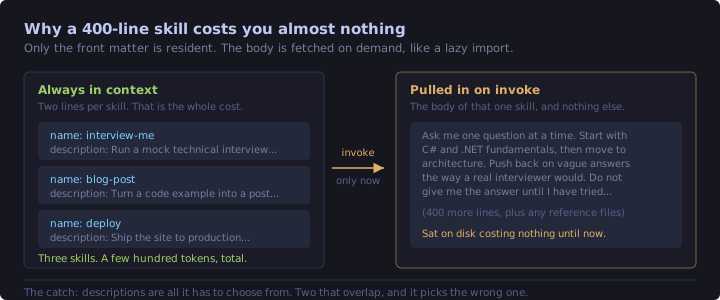
Only the name and description stay in context. The body of the skill sits on disk and gets pulled in when something actually invokes it.
This inverts how you should think about length. A four-hundred-line skill with reference material costs you two lines of context until the moment you run it. That makes skills the right home for anything long: a checklist you follow, a multi-step procedure, a review process with real detail in it. All the things that would bloat CLAUDE.md beyond usefulness are nearly free here.
It also means the description is doing all the work. It is the only thing Claude sees when deciding whether a skill is relevant, and it gets truncated at 1,536 characters in the listing, so front-load the main use case rather than building up to it. Which leads to the trap.
Overlapping descriptions make it pick wrong. If you have a /review skill described as "review code changes" and a /pr-check skill described as "check a pull request for problems", those are the same sentence to a model. It will pick one, roughly at random, and you will not immediately notice. Descriptions need occasional re-reading with fresh eyes, specifically asking whether any two could be confused.
A real one
This is ~/.claude/skills/interview-me/SKILL.md, trimmed for length:
---
name: interview-me
description: Run a mock technical interview on a topic I name, one question
  at a time, in the style of a senior .NET hiring panel. Use when I want to
  practice or find gaps in my own understanding.
disable-model-invocation: true
argument-hint: [topic]
---

Run a mock technical interview. The topic is `$ARGUMENTS`.

## How to run it

Ask **one question at a time**. Wait for my answer. Never move on until I
have answered or explicitly said I do not know.

## How to respond to my answers

- If I am **right**, say so briefly and go deeper on the same thread.
  One good follow-up beats three shallow questions.
- If I am **vague**, push back the way a real interviewer would. "You said
  it handles concurrency. How?" Do not accept buzzwords.
- If I am **wrong**, do not correct me immediately. Ask a question whose
  answer exposes the problem, and let me find it.

## Rules

- Never ask more than one question per message.
- Never give me the answer in the same message as the question.
- Assume 15 years of C# and .NET. Do not explain what an interface is.
Two bits of frontmatter doing real work. disable-model-invocation: true means Claude will never decide on its own that now is a good moment to interview me, which it absolutely would. And argument-hint gives autocomplete something to show, so /interview-me async works.
The frontmatter fields worth knowing about beyond name and description: allowed-tools pre-approves specific tools for the turn that invokes the skill, model and effort override those settings while the skill is active, and context: fork runs the whole thing in a subagent so it does not consume your main conversation's context.
Global or project
Global (~/.claude/skills/) for anything about how you work. /interview-me is about me, so it is global.
Project (.claude/skills/) for anything about this codebase, and commit it. A /deploy skill that encodes your actual deploy steps is worth more in the repo than in any wiki, because it is right next to the thing it deploys and it runs.
Hooks
Rules are guidance. Hooks are code that runs whether Claude cooperates or not. That is the whole distinction and it is why hooks are worth the extra effort for anything that genuinely must happen.
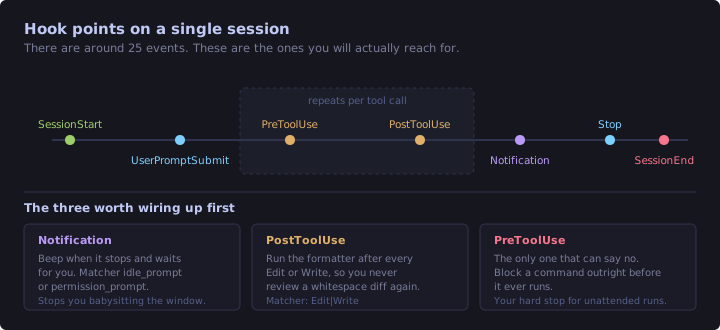
There are around thirty events. You will use three or four.
The one I wanted first
The problem: you send a long task off, switch to something else, and come back nine minutes later to find it has been sitting there waiting for a permission prompt for eight of them. A Notification hook fixes that.
The script, at ~/.claude/notify.ps1:
# Claude Code sends the hook payload as JSON on stdin. We do not need much
# from it, but reading it keeps the pipe from blocking.
$raw = [Console]::In.ReadToEnd()

$type = "unknown"
try {
    $payload = $raw | ConvertFrom-Json
    if ($payload.message) { $type = $payload.message }
    elseif ($payload.hook_event_name) { $type = $payload.hook_event_name }
} catch {
    # Malformed or empty payload is not worth failing the hook over.
}

[console]::beep(880, 150)
[console]::beep(1180, 180)

$line = "{0}  {1}" -f (Get-Date -Format 'yyyy-MM-dd HH:mm:ss'), $type
Add-Content -Path "$HOME\.claude\notify.log" -Value $line -Encoding utf8

exit 0
And the wiring, in ~/.claude/settings.json:
{
  "hooks": {
    "Notification": [
      {
        "matcher": "idle_prompt|permission_prompt",
        "hooks": [
          {
            "type": "command",
            "command": "powershell -NoProfile -ExecutionPolicy Bypass -File C:\\Users\\you\\.claude\\notify.ps1",
            "timeout": 10
          }
        ]
      }
    ]
  }
}
Notes from getting this working on Windows:
- The
matcherfilters by notification type.idle_promptfires when it is waiting on you generally,permission_promptwhen a specific approval is blocking. Leave the matcher off entirely and you get every notification, which gets annoying fast. - Use an absolute path in the
command. PowerShell will not expand~in a-Fileargument the way the shell does elsewhere. -NoProfilematters. Without it every hook invocation pays for loading your PowerShell profile.- The log line is not decoration. It is how you confirm the hook is firing at all, because a silent hook and a broken hook look identical. Test the script standalone before wiring it up:
'{"hook_event_name":"Notification","message":"waiting"}' | powershell -NoProfile -File "$HOME\.claude\notify.ps1"If that appends a line to notify.log and exits 0, the script is fine and anything still broken is the config.
The other two worth having
PostToolUse with a matcher of Edit|Write runs your formatter every time a file is touched. You stop reviewing whitespace diffs entirely. This is the highest value-per-line hook there is.
PreToolUse is the only event that can block a tool call before it happens. That makes it your hard stop: the thing that refuses a destructive command regardless of what mode you are in or what the model decided. If you ever run unattended, this is what stands between you and a bad afternoon.
Subagents
Subagents live in .claude/agents/ and each one is a markdown file describing a specialist with its own tools and its own context window.
They are genuinely good at one shape of problem: wide, shallow search. "Find every place we construct an HttpClient directly" across a large solution is perfect, because the agent reads fifty files, and only the answer comes back to your conversation rather than fifty files' worth of context.
They are bad at the opposite shape. Every subagent starts cold. It does not know what you have discussed, what you already ruled out, or what the last three attempts looked like. If you have spent forty minutes building up context on a problem, handing it to a subagent throws all of that away and you will spend longer re-explaining than doing it yourself.
Rule of thumb: delegate breadth, keep depth.
Three commands worth adding to muscle memory
/insights analyses your own sessions and reports back on what you work on, how you interact, and where the friction is. It is the only one of the three that tells you something about yourself rather than the project, and the friction points are usually a to-do list of skills and rules you have not written yet.
/btw asks a side question without polluting the main conversation. This is more useful than it sounds. You are deep in a refactor and you want to know what a flag does. Normally you either ask and permanently add that exchange to your context, or you open another terminal. /btw is neither.
/schedule and /loop both run prompts on a schedule and are not the same thing. /loop is session-scoped: it runs while this conversation is open, on your machine, and it is what you want for polling a build for the next twenty minutes. /schedule sets up cloud Routines that run on Anthropic's infrastructure whether or not your laptop is on. Reach for /loop when you are waiting on something now, and /schedule when you want something to happen on Tuesday.
Revision checklist
- Global
~/.claudedescribes you, project.claudedescribes the codebase. Commit the project one. - Run
/init, then delete half of what it wrote. CLAUDE.mdloads on every session and costs tokens every turn. Short beats thorough.- Four layers stack: enterprise, user, project, subdirectory. Nothing overwrites anything.
- Point at reference files rather than inlining them. One line resident, full detail on demand.
- Past roughly 200 lines, split
CLAUDE.mdinto.claude/rules/. - Rules with
paths:load only when a matching file enters context. Rules without load always. - Rules and
CLAUDE.mdare guidance. Hooks are enforcement. - Skills: only
nameanddescriptionstay resident, the body loads on invoke. Long skills are nearly free. - Overlapping skill descriptions cause wrong picks. Re-read them occasionally.
disable-model-invocation: truefor anything that should only run when you ask.Notificationhook to stop babysitting,PostToolUseto auto-format,PreToolUseto block.- Subagents for breadth, not depth. They always start cold.
/insightsfor your own patterns,/btwfor side questions,/loopfor now and/schedulefor Tuesday.
What this does not cover
Everything here still runs on your machine, in a session you are sitting in front of.
The next post, Claude Code at Work, goes after the rest: MCP servers for connecting it to tools it did not ship with, plugins for packaging all of the above so it installs in one command, headless mode for calling it from a script, and the guardrails you want in place before anything runs while you are asleep.