Most people install Claude Code, type a request, hit enter, and never change a single setting after that. It works well enough that you never have to. That is exactly the problem, because there are three dials that decide whether you get good work out of it, and running on defaults means you are only ever pulling one of them.
The three are: which model you are on and how hard it is thinking, how much you let it do without asking you, and how full its memory is by the time you get to the interesting part of the task.
None of this is about writing better prompts. It is about understanding what is actually happening on the other side of the terminal so you can tell the difference between "this model is not good enough" and "I have given it no chance to succeed."
Where it runs
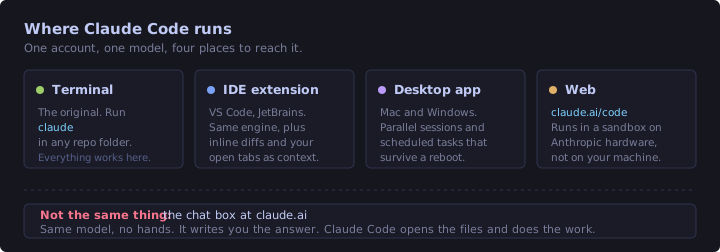
Same account, same model, four front doors. The terminal is the original and everything works there first. The VS Code and JetBrains extensions run the same engine and add inline diffs plus your open tabs as context. The desktop app is the one to reach for when you want several sessions running at once or tasks that survive a reboot. And claude.ai/code runs in a sandbox on Anthropic's hardware, which means no access to your local files.
The distinction worth internalizing is the one at the bottom of that diagram. The chat box at claude.ai and Claude Code are the same model with completely different reach. Chat writes you the answer. Claude Code opens the file and makes the change. If you have ever pasted a diff out of a browser tab and then hand-applied it, you already understand why that matters.
The only loop it runs
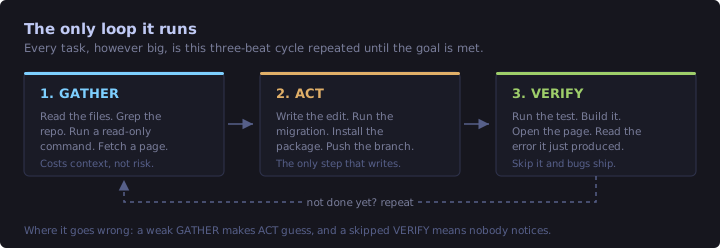
Everything Claude Code does, from renaming a variable to migrating a project, is this three-beat cycle repeated until it thinks the goal is met. Gather information, act on it, verify the result.
Once you see the loop you start diagnosing failures differently. Bad output almost always traces back to a weak first beat or a skipped third one:
- If it guessed at your conventions, it did not gather enough. It never read the file that would have told it. Pointing it at that file fixes more problems than rephrasing your request ever will.
- If it broke something and did not notice, it skipped verify. This is where the "it said it was done and it was not" complaints come from. Almost always, nobody ran the build.
- If it keeps trying the same fix, the loop is spinning. Gather produced nothing new, so act produced the same thing. You have to break that yourself.
What is already loaded before it reads your message
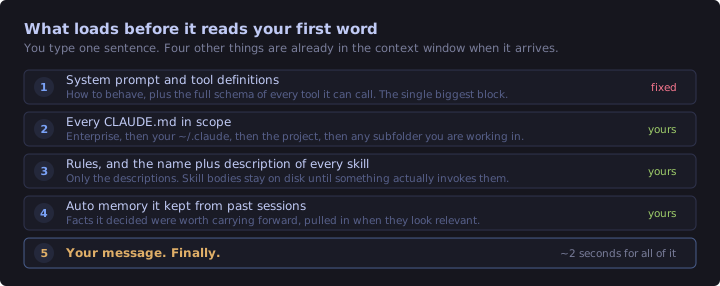
You type one sentence. By the time it arrives, four other things are already sitting in the context window ahead of it.
The first block, the system prompt plus the schema of every available tool, is the single largest thing in a fresh session and there is nothing you can do about it. The next three are yours: your CLAUDE.md files, your rules and skill descriptions, and whatever it decided to remember from past sessions.
Two things follow from this. Your instructions are read before your request, every single time, which is why a well-written CLAUDE.md beats repeating yourself in chat. And you are never starting from an empty window, so if you run /context on a fresh session and wonder why it is not at zero, that is the answer.
Tokens, without the hand-waving
A token is roughly three quarters of an English word. You will see "one token is about one word" in a lot of introductions, and it is close enough for a rough estimate, but code and punctuation tokenize worse than prose so the real number is always higher than you would guess from word count.
How big the window is depends on the model, and the answer changed recently enough that a lot of writing about this is out of date. Opus 5, Sonnet 5 and Fable 5 all have a one million token context window on the Anthropic API, and it is the default with no beta header needed. The 200,000 figure you will still see quoted everywhere applies to older models like Sonnet 4.5 and Haiku 4.5.
The metaphor that actually helped me: it is a desk, not a filing cabinet. Everything Claude needs to see at once has to be on the desk simultaneously. It is not searching an archive, it is looking at what is spread out in front of it.
A million tokens sounds like more room than you could ever need. It is not, and the reason is further down: quality starts degrading long before the window is anywhere near full.
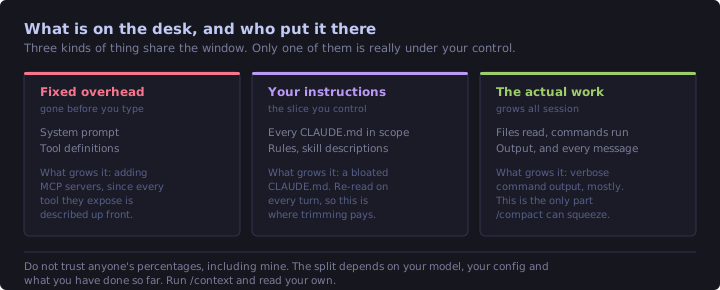
What lands on the desk and stays there:
- The system prompt and tool definitions. Mostly fixed, though every MCP server you connect adds its tools to this block permanently.
- Every
CLAUDE.md, rule, and skill description in scope. - The full contents of every file it reads. A 900-line component is a 900-line component.
- The output of every command it runs. A failing test suite that prints 400 lines of stack trace costs you 400 lines of stack trace.
- Every message either of you has sent, all the way back to the start.
That fourth one catches people out. Running a verbose build twice can cost you more context than the source file you are trying to fix.
Models, and what they actually cost you
You pick a model with /model, and mostly you pick an alias rather than a version number:
| Alias | What it is | Reach for it when |
|---|---|---|
opus |
The heavyweight. Resolves to Opus 5 on the Anthropic API | Architecture, gnarly debugging, anything you would think hard about |
sonnet |
The daily driver. Resolves to Sonnet 5 | Most coding work, most of the time |
haiku |
Fast and cheap | Renames, formatting, "what does this file do" |
fable |
Available in the picker alongside the others | Worth trying on your own workload rather than taking my word for it |
opusplan |
Opus while planning, Sonnet to execute | Big tasks where the thinking matters more than the typing |
You will also see sonnet[1m] and opus[1m] in the docs. Those date from when these models had smaller windows, and on the Anthropic API today they do nothing, because sonnet and opus already resolve to models with a native one million token window. They still matter behind an LLM gateway or on some cloud providers. Ignore them otherwise.
The cost angle is the part that catches people. On a Pro or Max subscription you are not billed per token, you are spending against a usage allowance, and a heavier model drains it faster for the same work. Running Opus to rename a variable is not wrong, it is just expensive in a currency you only notice when you run out on a Friday afternoon. /usage tells you where you stand before that happens.
opusplan deserves a specific mention because it maps neatly onto how the work actually splits. The hard part of a refactor is deciding what to change. Once that is settled, executing it is mechanical. Paying heavyweight rates for the mechanical half is money you did not need to spend.
Effort levels, the dial nobody touches
Separate from which model you are on is how hard it thinks before answering. That is the effort level, and you set it with /effort.
| Level | What it is for |
|---|---|
low |
Short, scoped, latency-sensitive work where being clever is not the point |
medium |
Cheaper, when you will accept slightly less capability |
high |
Balanced, and the default almost everywhere |
xhigh |
Deeper reasoning, more tokens spent thinking |
max |
Deepest reasoning. Prone to overthinking, so test it rather than adopting it everywhere |
high is the default on every model that supports effort, with one exception: Opus 4.7 defaults to xhigh. Either way the dial is already sitting somewhere sensible, and that is precisely why it goes untouched for months. Two things are worth knowing about it.
First, effort costs tokens directly. Thinking happens in the context window like everything else, so a session at xhigh fills up faster than the same session at high. You are trading context budget for reasoning depth.
Second, if you only want deeper thinking on one particular message, you do not have to change the session setting at all. Put the word ultrathink anywhere in that prompt. Claude Code recognizes it and asks for deeper reasoning on that turn only. Worth knowing that "think hard" and "think more" are not magic words, they are just ordinary text.
Permission modes
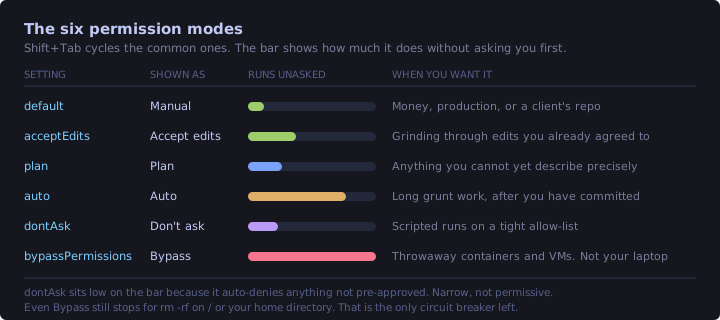
There are six, and Shift+Tab cycles the common ones. This is the dial with actual consequences, so it is worth knowing all of them rather than the two you happened to discover.
| Mode | Shown as | What it does |
|---|---|---|
default |
Manual | Asks before the first use of each tool. The safe baseline |
acceptEdits |
Accept edits | Auto-approves file edits and ordinary filesystem commands in your working directory |
plan |
Plan | Reads and explores, never edits your source. Produces a plan and waits |
auto |
Auto | Auto-approves, with background safety checks against what you actually asked for |
dontAsk |
Don't ask | Auto-denies anything not explicitly pre-approved. Narrow, not permissive |
bypassPermissions |
Bypass | Skips the prompts. Containers and VMs only |
The one people misread is dontAsk. The name sounds like the loosest setting on the list. It is the opposite: it never prompts because it refuses anything outside your allow-list. That is a scripted-run mode, not a convenience mode.
Here is the test I actually use, and it comes from Terraform rather than anything abstract. Would I let this run terraform apply while I was making tea? If the answer is no, I am in Plan or Manual. There is a real difference between letting something edit a .tf file and letting it talk to AWS, and permission modes are the place where you get to draw that line explicitly instead of hoping.
Plan mode is the one I would push hardest. For anything you cannot already describe precisely, spending a couple of minutes reading a plan beats spending twenty minutes unpicking work that went the wrong direction from the second file onwards.
Prompting, briefly
Most prompting advice is about phrasing. Almost none of the benefit is in phrasing.
Context beats wording. "Fix the failing test" and "fix the failing test, it started after I changed the retry logic in PaymentClient, and the fixture in TestData.cs may be stale" are the same request. The second one skips three rounds of the gather step.
Say what done looks like. Not "make it better", which is unfalsifiable. "The build passes and no method is longer than 40 lines" can actually be checked, which means the verify step has something to check against.
Paste the error, do not summarize it. Your summary is lossy. The stack trace has the line number in it.
Screenshots are prompts. Dragging in a picture of the broken layout replaces a paragraph of description you would have got slightly wrong anyway.
The current models cope fine with thin prompts, and that is a genuine improvement over where we were a year ago. It is not a reason to write them. A thin prompt still means it has to guess at the things you did not say, and it will guess reasonably, and reasonable is not the same as right.
Context rot, and when it shows up
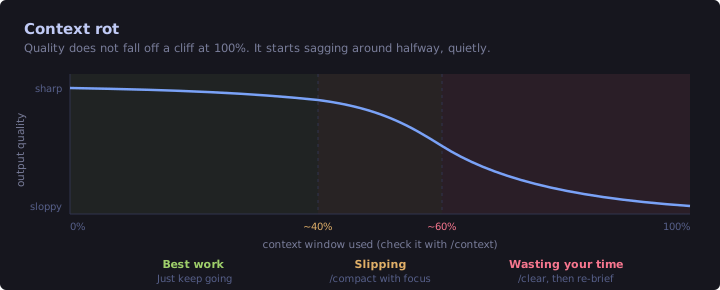
Context rot is Anthropic's own term for it, and it is the reason a bigger window does not simply solve the problem. As the token count grows, accuracy and recall degrade. Quality does not fall off a cliff when the window fills, it sags gradually, and the sag is easy to miss because it looks like the model getting lazy rather than the session getting full.
Treat the percentages below as a rule of thumb rather than a specification. What matters is the direction of travel, not the exact number where you intervene.
The symptoms are specific enough to recognize:
- It starts re-reading files it already read an hour ago.
- It reintroduces a bug you fixed earlier in the same session.
- Answers get shorter and more generic, as though it is skimming.
- It forgets a constraint you stated clearly, once, near the beginning.
Hallucination is a different failure with a similar look. It shows up as confident, plausible, specific detail that happens to be wrong: a method that does not exist, a flag that was never added, a config key from a neighbouring tool. It gets more likely when the model is reasoning about something it has not actually read, so the fix is nearly always to make it read the thing rather than to ask it more firmly.
The practical habit is boring and it works. Run /context when you notice the sag, believe the number, and act on it rather than pushing through.
Back up before you let it run
Everything above assumes you are watching. The moment you switch to Auto or Bypass and walk away, you need a way back, because that is the whole price of admission for letting something work unattended.
Ranked by how much I trust them:
- Commit, or branch, before the run. Nothing beats this.
git checkout .is an instant, total undo and it costs you five seconds up front. git stashif you are mid-change and not ready to commit. Same idea, less ceremony.- A worktree for genuinely risky work, so the experiment happens somewhere that is not your working copy at all.
/rewind, which is built in. Claude Code snapshots before every file edit, so you can roll back to a checkpoint from inside the session.- A folder copy, if whatever you are pointing it at is not under version control. Not elegant. Better than nothing.
One caveat on /rewind, because it is the one most likely to give false confidence. It is session-scoped. It is an undo button for the conversation you are currently in, not a version control system, and it is not a substitute for a commit. Use both. The commit is the one that is still there tomorrow.
Managing the memory budget
Five commands. This is the entire toolkit.
| Command | What it does | When |
|---|---|---|
/context |
Shows what is filling the window, as a grid | Before starting anything complex, and whenever quality dips |
/compact |
Summarizes the conversation so far to free space | Around the middle of the window, when you want to keep going |
/clear |
Empties the context and starts fresh | Switching tasks, or when compacting is no longer helping |
/rewind |
Rolls back to an earlier checkpoint | It went the wrong way and you want the files back |
/usage |
Shows where you are against your plan's limits | Before a long session, so it does not end at the worst moment |
Your files are never affected by /clear or /compact. Those two only touch the conversation. And your CLAUDE.md survives all of it, because it is re-read at the start of the next session regardless.
The one piece of judgement worth passing on: stop compacting repeatedly. Each /compact is lossy. Compacting once is a good trade. By the third time, you are working from a summary of a summary of a summary, and the specific detail you needed, the constraint you mentioned in message four, is long gone. It will not tell you it dropped it.
When you get to that point, /clear and re-brief in one deliberate paragraph. You know what actually matters in this task. The compaction algorithm is guessing. Twenty seconds of writing a clean brief will beat a fourth compaction every time.
If you must compact, /compact takes focus instructions. /compact keep the API contract decisions and the failing test names is a much better instruction than letting it choose for you.
Revision checklist
- Claude Code and the claude.ai chat box are the same model with different reach. One writes the answer, the other makes the change.
- Every task is gather, act, verify, repeated. Bad output usually means a weak gather or a skipped verify.
- Your message is the fifth thing loaded, after the system prompt, your
CLAUDE.mdfiles, rules and skill descriptions, and remembered facts. - A token is about three quarters of a word. Opus 5 and Sonnet 5 have a 1M window, older models have 200k, and either way it is a desk, not a filing cabinet.
- The system prompt and tool schemas are a fixed cost you pay before typing anything. What share of the window that eats depends on the model and your setup, so read
/contextrather than assuming a number. /modelpicks the model,opusplanplans with Opus and executes with Sonnet, and heavier models drain a subscription allowance faster./effortsets thinking depth.highis the default everywhere except Opus 4.7. Effort spends context.ultrathinkin a prompt gets depth for one turn only.- Six permission modes.
dontAskauto-denies rather than auto-approves, despite the name. - Plan mode for anything you cannot describe precisely yet.
- Context rot starts around halfway and looks like laziness. Hallucination looks like confident wrong detail, and usually means it did not read the file.
- Commit before any unattended run.
/rewindis session-scoped and is not a git replacement. /compactis lossy. Once is fine. A third time means you should have run/clearand re-briefed.
What this does not cover
Nothing here touches configuration. Everything above is about driving the tool well in a single session, and every one of those sessions started from the same blank slate.
The next post, Inside the .claude Folder, is about the other half: teaching it your conventions once, in files, so you stop paying for the same corrections every session. CLAUDE.md strategy, rules, skills, hooks, and the handful of commands worth adding to your muscle memory.
The nudge for writing this down was Mark Kashef's "Claude Code for Everyone" session on O'Reilly, though the deck is pitched at people who have never opened a terminal and most of what is above came from chasing the details afterwards.